| English | Japanese |
|
|
Yesterdays access |
| Page Top | [Lily Diary.】 A diary of life in Mindanao. |
| 26/08/05 | IC-820H Receiver Sensitivity Test |
| 26/08/02 | Satellite SatBox Development in Progress - Part 2 |
| 26/07/16 | Delivery of the 3D printed panels |
| 26/07/09 | Development of SatBox for satellites |
| 26/07/05 | Weather Monitor Indoor Unit |
| 26/06/30 | Creating data for 3D printers using FreeCAD |
| 26/06/16 | Installing an AS5600 magnetic encoder on a KR-500. |
| 26/06/05 | Grandson Zion's CQ |
| 26/06/04 | Replacing the potentiometer on the KR-500 elevation rotator |
| 26/06/03 | Making a Repeater Controller Pert4 |
| 26/06/01 | Weather Monitor software |
| 26/05/31 | Weather Monitor |
| 26/05/21 | JTDX Auto Run BUGFIX |
| 26/05/17 | Repair of satellite antenna system |
| 26/05/13 | Repair of Alinco DR130 |
| 26/05/07 | Making a Repeater Controller Pert3 |
| 26/05/03 | Indonesian satellite friend YC8RPK |
| 26/04/26 | DXCC200 achieved |
| 26/04/23 | Communication via ISS voice repeater |
| 26/04/20 | WSJT-X Auto Run Ver0.1.5 |
| 26/04/19 | Got an Alinco DR-130 |
| 26/04/15 | Clublog Charts |
| 26/04/10 | Regarding POC transceivers |
| 26/04/08 | Using KENWOOD AT-300 with YAESU radio |
| 26/03/17 | How to establish a radio club in the Philippines |
| 26/03/10 | KENWOOD AT-300 with YAESU radio |
| 26/02/27 | Philippine NTC Amateur Radio License Examination Question Bank |
| 26/02/20 | Package received from JK1SNS |
| 26/02/18 | Temporary License Renewal |
| 26/02/14 | Satellite Tracking Software SatTrack |
| 26/02/05 | Making a Repeater Controller Pert2 |
| 26/02/02 | CQ on satellite IO-86 |
| 26/01/27 | Shack & Repeater Controller |
| 26/01/16 | Making a Repeater Controller |
| 26/01/16 | Making aRotator Interface PCB |
| 26/01/10 | Satellite antenna installation |
| 26/01/08 | WSJT-X Remote Operation |
| 26/01/07 | JTDX Remote Operation |
| 26/01/04 | log_reciver_Ver2.6.6 |
| 26/01/04 | Tailscale VPN software for JTDX_Remote |
| Online Multiple Choice Reviewers to the Phil Amateur Radio Examination by 4F3EW A joint project by JI1FGX/DU9 and DV9JRD |
| Satellite SatBox Development in Progress - Part 2 (2026/08/02) | |||||||||||||||||||||||||||||||||||
|---|---|---|---|---|---|---|---|---|---|---|---|---|---|---|---|---|---|---|---|---|---|---|---|---|---|---|---|---|---|---|---|---|---|---|---|
| 'Would it be possible to create a controller that can track satellites without a computer?' That's how the development of SatBox began. SatBox performs satellite orbit calculations, AOS/LOS (times of satellite appearance and disappearance) predictions, and automatic control of antenna rotators. Furthermore, it is a fully autonomous satellite communication controller that handles everything from Doppler control of the radio transceiver to all-in-one control. There is no need to install any software on your computer; the SatBox alone can handle everything from satellite tracking to controlling the radio and rotator. We have a proven track record of numerous communications with FM satellites (ISS, SO-50) and linear satellites (RS-44), and our operation has been confirmed in actual satellite communications.  |
|||||||||||||||||||||||||||||||||||
| The CPU is a dual-core 32-bit microcontroller. ESP32-S3. We use this method. I'm using the Arduino IDE for development. Unlike typical Raspberry Pi devices that require an OS (Linux), this device operates solely on the microcontroller. It achieves fast startup and stable continuous operation.  |
|||||||||||||||||||||||||||||||||||
 |
|||||||||||||||||||||||||||||||||||
| Pressing the Sat button will display a list of satellites that can be tracked. By selecting multiple satellites, the system will automatically switch to the next satellite after the current one completes its path, enabling continuous satellite tracking.  |
|||||||||||||||||||||||||||||||||||
The rotator automatically tracks satellites, but both the azimuth (AZ) and elevation (EL) can also be freely controlled manually. |
|||||||||||||||||||||||||||||||||||
| You can operate and configure SatBox from your computer's web browser. No special software installation is required. You can access it from any device that can use a web browser, such as Windows, Mac, smartphones, and tablets. The basic functions and operability are based on SatPC32, which is widely used in amateur satellite communications around the world. However, currently, the only compatible radio is the ICOM IC-820H. We plan to gradually add more compatible models in the future, such as the ICOM IC-9700 and Yaesu FT-847. The very bottom.CALL.The input field is for recording the communication log of satellite communications. Enter the call sign of the station you communicated with.Enter.Simply pressing a key will record the data to an ADIF file. Simultaneously, it will be uploaded in real time to LoTW, Club Log, and eQSL. Currently, this real-time logging feature is only available on the Windows version. 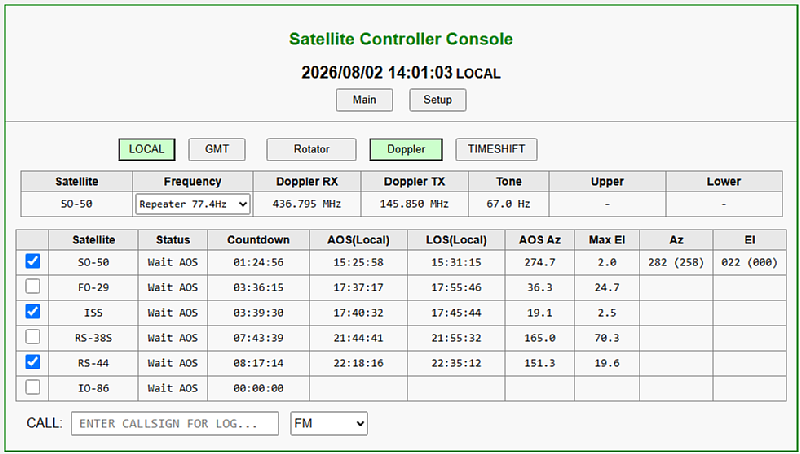 |
|||||||||||||||||||||||||||||||||||
| To ensure smooth operation with linear satellites, it is equipped with a function to adjust the reception offset. If you are transmitting at the reference uplink frequency but cannot hear your own downlink signal, Press the 'Receiving Manual' button and use the radio's VFO to find your station's downlink signal. Once a signal is detected, simply press the 'Tracking resumed' button, and Doppler tracking will resume based on that frequency difference (OFFSET). This OFFSET is saved for each satellite and automatically loaded for subsequent operations, so once adjusted, it does not need to be set again each time. 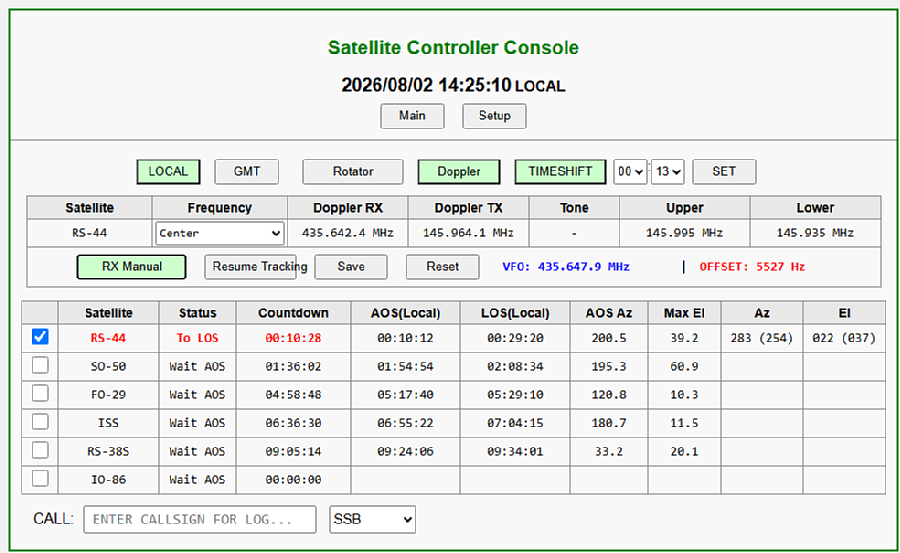 |
|||||||||||||||||||||||||||||||||||
| By pressing the 'TIME SHIFT' button, you can simulate the satellite path at any given date and time. You can now perform antenna tracking and Doppler control operation checks and settings tests anytime without having to wait for the next AOS (Advanced Operation System). 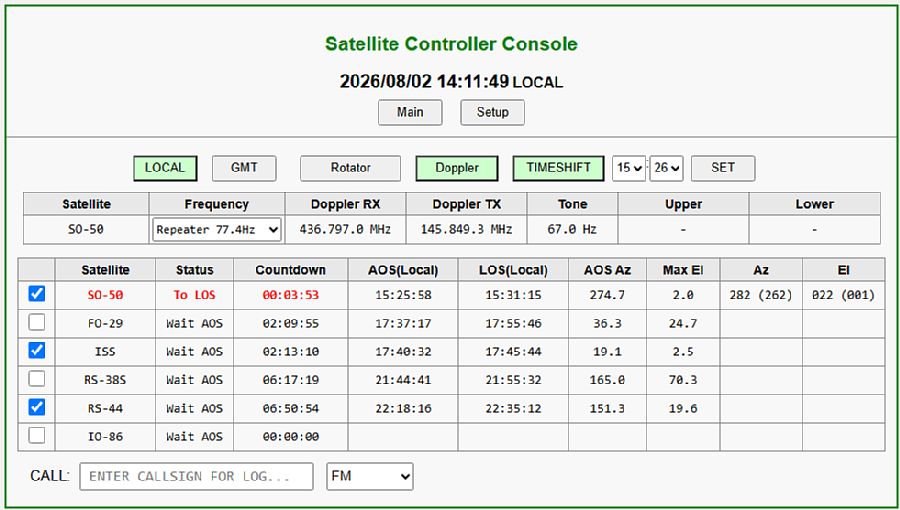 |
|||||||||||||||||||||||||||||||||||
This is the menu for configuring SatBox settings.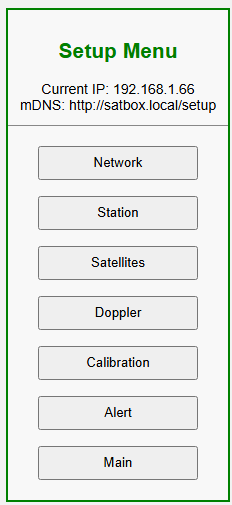 |
|||||||||||||||||||||||||||||||||||
| SatBox has built-in Wi-Fi and can be configured and operated via a web browser. Because it supports mDNS, there is no need to set a static IP address; you can access it using a domain name (e.g., satbox.local). You can easily connect from any device with a web browser, such as Windows PCs, Macs, smartphones, and tablets. 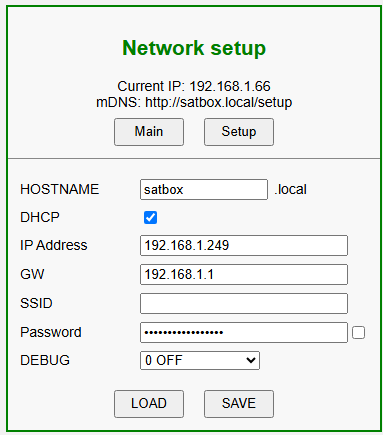 |
|||||||||||||||||||||||||||||||||||
| This is the input screen for your station's information. By selecting a language, you can choose to display the information in Japanese or English. 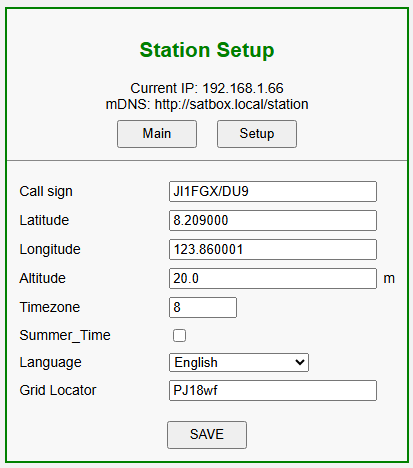 |
|||||||||||||||||||||||||||||||||||
| This is the screen where you select the satellite you want to track. Satellite orbit data (NASA.ALL.These files are downloaded automatically when SatBox starts and every day at 13:00. Also,'NASA.ALL updated'.You can manually download the latest orbital data at any time by pressing a button. You can register up to 10 satellites as tracking targets. 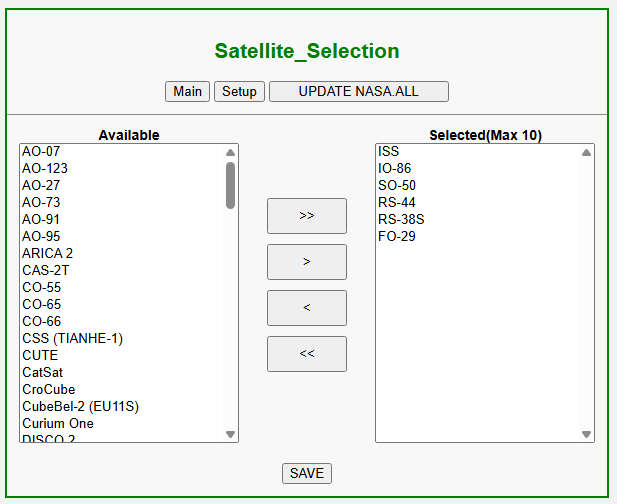 |
|||||||||||||||||||||||||||||||||||
| This screen allows you to set the frequency and communication mode used for Doppler calculations for each satellite. The configuration file is saved in CSV format and supports both FM and linear satellites.
NOR. This is a normal frequency conversion (FM satellite, etc.), REV. This represents the reverse conversion used in linear transponder satellites. In linear satellites such as RS-44, the third column is not the downlink frequency.Conversion constant.This will be saved. This value is used to calculate the corresponding downlink frequency in real time from the uplink frequency. 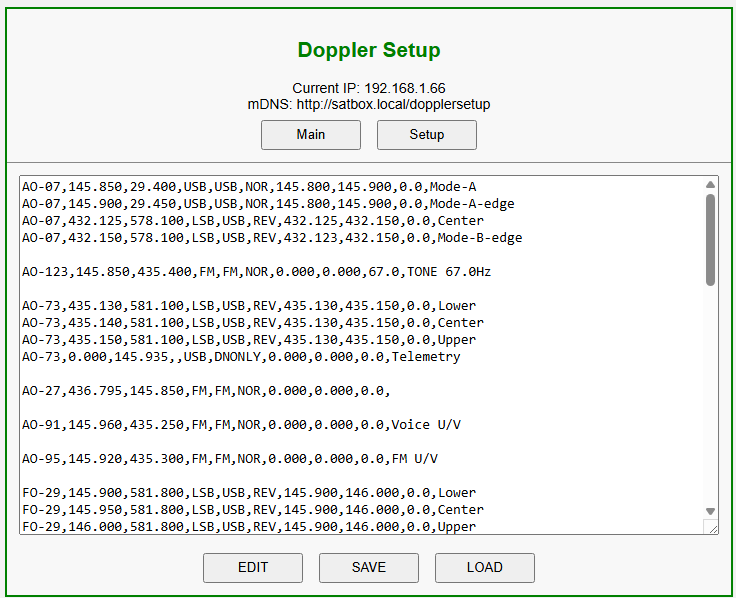 |
|||||||||||||||||||||||||||||||||||
This is the rotator calibration screen.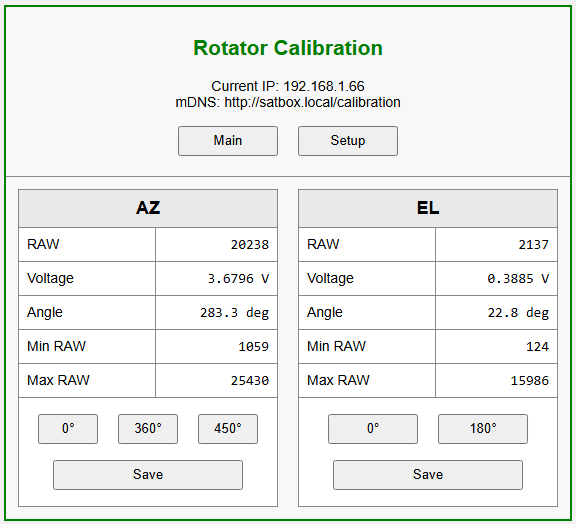 |
|||||||||||||||||||||||||||||||||||
You can receive email notifications before the satellite AOS launch.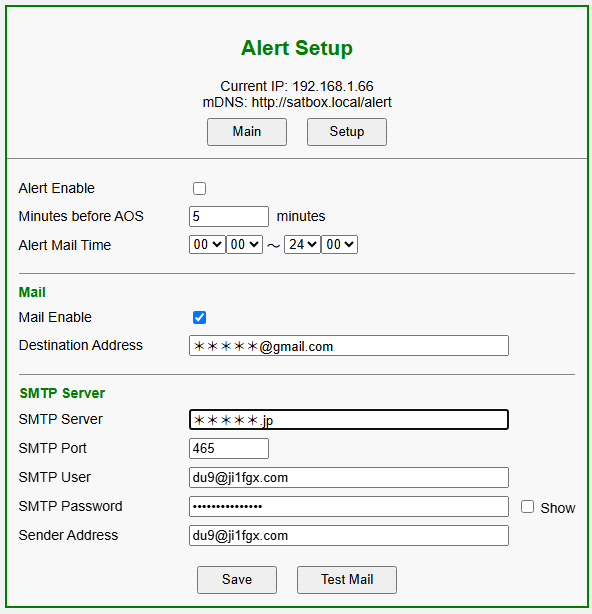 |
|||||||||||||||||||||||||||||||||||
 |
|||||||||||||||||||||||||||||||||||
| July 16, 2026. August 5, 2026. |