| English | Japanese |
|
|
Yesterdays access |
| Page Top | [Lily Diary.】 A diary of life in Mindanao. |
| 26/08/05 | IC-820H Receiver Sensitivity Test |
| 26/08/02 | Satellite SatBox Development in Progress - Part 2 |
| 26/07/16 | Delivery of the 3D printed panels |
| 26/07/09 | Development of SatBox for satellites |
| 26/07/05 | Weather Monitor Indoor Unit |
| 26/06/30 | Creating data for 3D printers using FreeCAD |
| 26/06/16 | Installing an AS5600 magnetic encoder on a KR-500. |
| 26/06/05 | Grandson Zion's CQ |
| 26/06/04 | Replacing the potentiometer on the KR-500 elevation rotator |
| 26/06/03 | Making a Repeater Controller Pert4 |
| 26/06/01 | Weather Monitor software |
| 26/05/31 | Weather Monitor |
| 26/05/21 | JTDX Auto Run BUGFIX |
| 26/05/17 | Repair of satellite antenna system |
| 26/05/13 | Repair of Alinco DR130 |
| 26/05/07 | Making a Repeater Controller Pert3 |
| 26/05/03 | Indonesian satellite friend YC8RPK |
| 26/04/26 | DXCC200 achieved |
| 26/04/23 | Communication via ISS voice repeater |
| 26/04/20 | WSJT-X Auto Run Ver0.1.5 |
| 26/04/19 | Got an Alinco DR-130 |
| 26/04/15 | Clublog Charts |
| 26/04/10 | Regarding POC transceivers |
| 26/04/08 | Using KENWOOD AT-300 with YAESU radio |
| 26/03/17 | How to establish a radio club in the Philippines |
| 26/03/10 | KENWOOD AT-300 with YAESU radio |
| 26/02/27 | Philippine NTC Amateur Radio License Examination Question Bank |
| 26/02/20 | Package received from JK1SNS |
| 26/02/18 | Temporary License Renewal |
| 26/02/14 | Satellite Tracking Software SatTrack |
| 26/02/05 | Making a Repeater Controller Pert2 |
| 26/02/02 | CQ on satellite IO-86 |
| 26/01/27 | Shack & Repeater Controller |
| 26/01/16 | Making a Repeater Controller |
| 26/01/16 | Making aRotator Interface PCB |
| 26/01/10 | Satellite antenna installation |
| 26/01/08 | WSJT-X Remote Operation |
| 26/01/07 | JTDX Remote Operation |
| 26/01/04 | log_reciver_Ver2.6.6 |
| 26/01/04 | Tailscale VPN software for JTDX_Remote |
| Online Multiple Choice Reviewers to the Phil Amateur Radio Examination by 4F3EW A joint project by JI1FGX/DU9 and DV9JRD |
| Developing a SatBox using an ESP32-S3 MCU (July 9, 2026) | |||||||||||||
|---|---|---|---|---|---|---|---|---|---|---|---|---|---|
| 'Would it be possible to create a controller that can track satellites without a computer?' That's how the development of SatBox began. SatBox.This includes satellite orbit calculation, AOS/LOS prediction, and integration with Doppler correction. Our goal is to achieve automatic control of the antenna rotator with a single unit. In the future, I hope to be able to incorporate Doppler control for wireless devices.  |
|||||||||||||
| Examples of automatic antenna tracking systems for amateur satellites include the ST2 from FOXDELTA. However, these require PC software such as SatPC32 and will not work on their own.  |
|||||||||||||
 |
|||||||||||||
Boot screen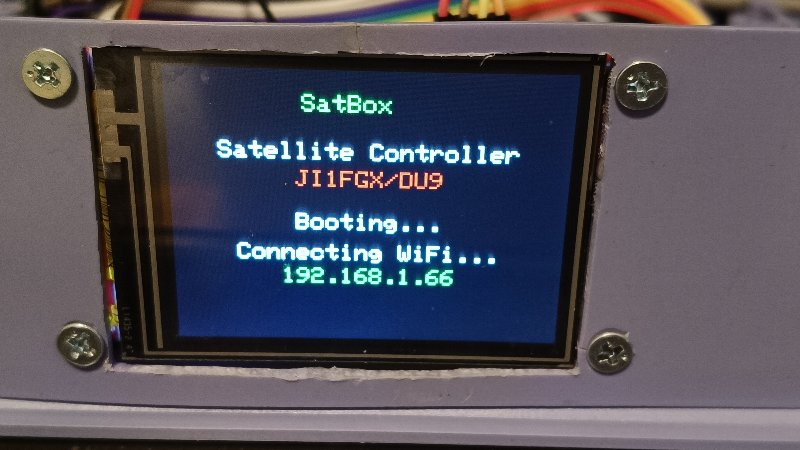 |
|||||||||||||
| Manual control screen for the rotator. Rotation is not possible between 0 degrees and 360 degrees (450 degrees) for Az, and between 0 degrees and 180 degrees or more for El. 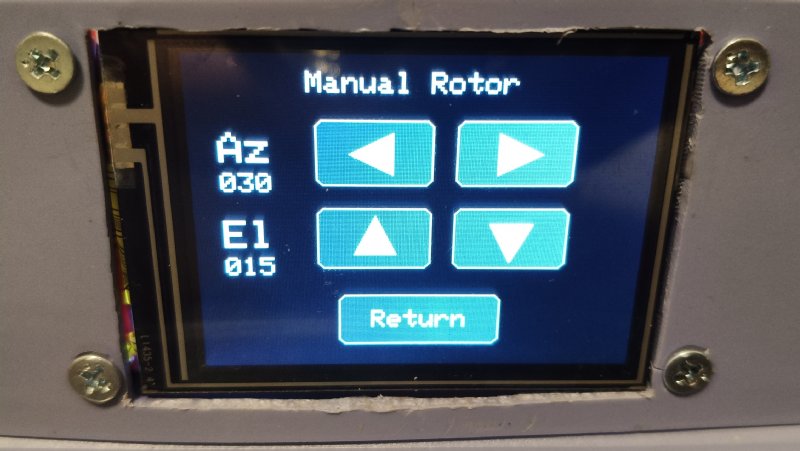 |
|||||||||||||
| The currently selected satellite list. You can choose whether to perform rotational control using the checkbox. 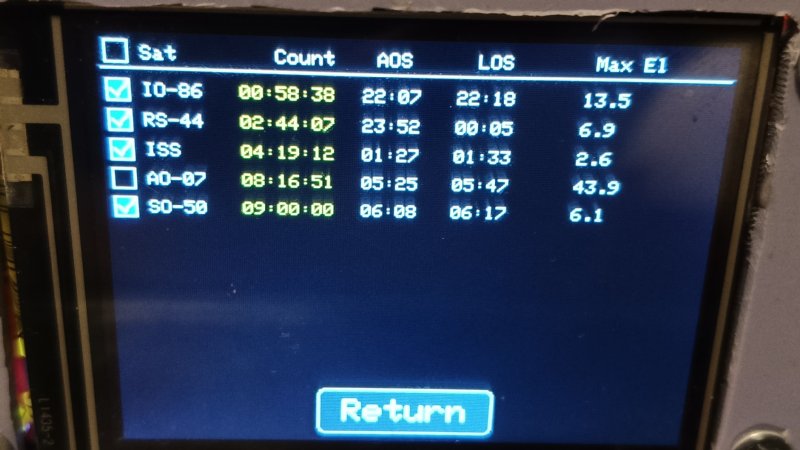 |
|||||||||||||
| Real-time monitoring via web browser from a PC or smartphone. A list of satellites is displayed, along with a countdown to when AOS will be activated. Additionally, you can continuously track satellites that have been checked in the checkbox. You can list up to 10 stations.  |
|||||||||||||
| Setup Menu. Various setup menus  |
|||||||||||||
| Network Setup This is the setting for accessing the site from a PC or smartphone using a web browser.  |
|||||||||||||
| Station Setup. Enter your station's call sign, latitude and longitude, altitude, time zone, and grid locator.  |
|||||||||||||
| Satrllite selection. You can select the necessary satellite from the satellite names in the NASA.all file.  |
|||||||||||||
| Rotator Calibration. Rotator Calibration The automatic control section for the rotator is also complete.  |
|||||||||||||
You can send an email alert before the satellite's AOS (Adaptive Operation System) is launched.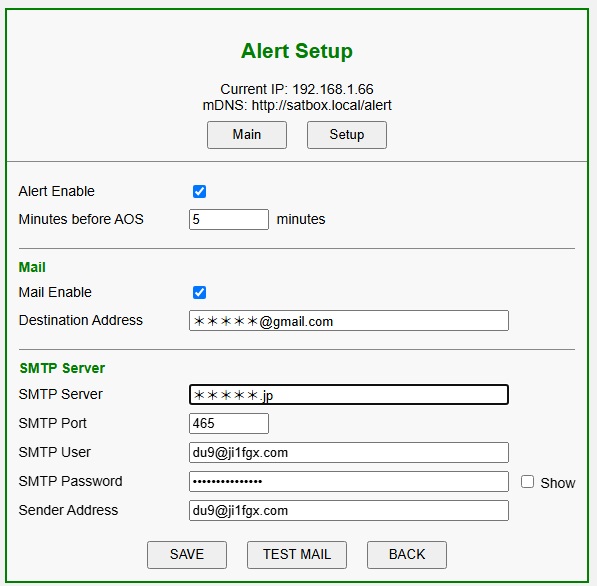 |
|||||||||||||
| July 5, 2026. July 16, 2026. |